NOT FOR REAL WORLD AVIATION. FOR FLIGHT SIMULATION USE ONLY.
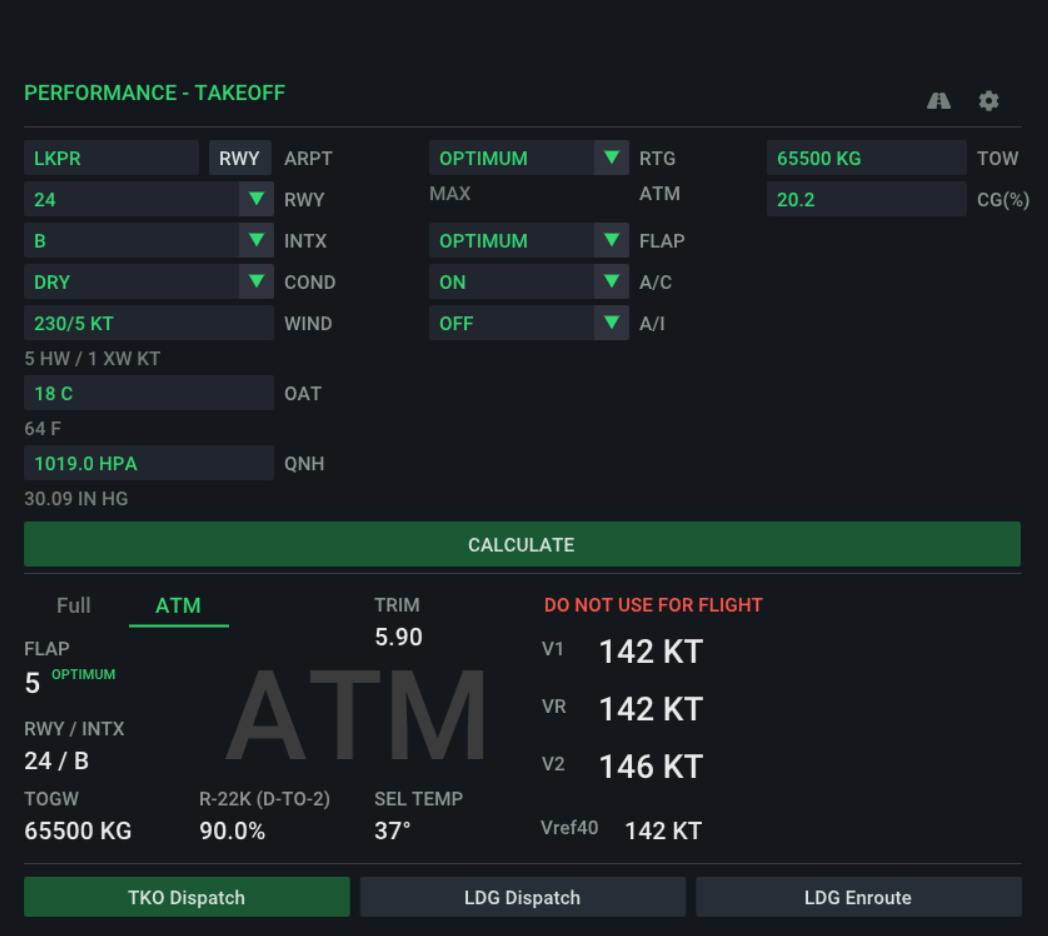
Do your takeoff performance calculations directly in the Zibomod cockpit. 737simpleOPT is a simplified Onboard Performance Tool for your Zibomod 737-800X.
The main goal of this project is to provide Zibomod pilots with an integrated performance calculation tool that replicates real-world procedures as faithfully as possible without the need for any expensive software or subscription.
Please note that while the project strives for the highest fidelity with the real OPT, results may vary. It is beyond my capacity to include every local airport specifics that may influence the final results.
737simpleOPT is developed as a passion project in my spare time. If you find the plugin and my other contributions to the development of the Zibomod useful and want to thank me in some way, you may use the button below to buy me a virtual beer or coffee :)
Pick the variants that suit you the best
The core calculation engine. Integrates directly into the Zibomod EFB tablet.
If you only intend to access performance calculator using the Zibomod EFB, this is all you need.
A plugin extension that adds a standalone floating window directly in the simulator.
Ideal for those who prefer a separate interface or want to have options. You
can still operate the performance calculator using the EFB as well.
An independent application running outside the simulator. Perfect for flight preparation on a second monitor or laptop.
737simpleOPT App also includes functionality
for editing the runway index database. Ideal for simmers who want to make their calculations even more precise by adjusting the runway/intersection data loaded from X-Plane according
to real world AIPs.
Input data exactly like in the real OPT. Full support for both Metric and Imperial units.
Runway database based on X-Plane data. Easily edit or add custom runway and intersection data directly within the 737simpleOPT App.
Calculations with fixed (26k/24k/22k) or optimum thrust rating and flaps setting, assumed temperature thrust reduction, windshear mode.
Use both plugins and App on all platforms supporting X-Plane. Native support for Windows, Linux and MacOS on both Intel and Apple Silicone platforms.
737simpleOPT is still work in progress, available in pre-release phase
The software provided here is FREE for non-commercial usage. Distribution as part of another product without explicit permission of the author is not allowed.
DISCLAIMER: All the software is provided "as is" without warranty of any kind, either express or implied. Use at your own risk.
This tool is for simulation purposes only and does not replace official performance documentation or approved OPT software. DO NOT USE FOR REAL WORLD AVIATION!
Current version: v0.3d (pre-release)
Package containing the Core plugin for all platforms.
Just unzip and copy the 737simpleOPT_plugin folder
to your X-Plane's plugins folder.
Current version: v0.3d2 (pre-release)
Package containing the GUI plugin for all platforms. Requires Core plugin.
Just unzip and copy the 737simpleOPT_gui folder
to your X-Plane's plugins folder next to the core plugin.
V0.3D2 Changelog
- Fixed scaling issue when X-Plane UI scaling set to more than 100%.
- Fixed RWY and INTX dropdown content bleeding outside of the dropdown.
- Added bindable jbr/737opt/toggle_window command for toggling the GUI window.
Current version: v0.3d (pre-release)
Standalone 737simpleOPT application. Does not require the simulator and can be used to edit runway database.
This section covers operation of the standalone app and GUI plugin. Not all the entry options are currently supported in the EFB integration in Zibomod. For instructions how to operate EFB integrated OPT see Zibomod documentation.
Each value entry field mimics the behaviour of the real OPT software and allows value entry in multiple ways, as described below. Both metric and imperial units are supported, see each entry description for more details.
Enter airport ICAO identifier and press the RWY button to fetch runway data for this airport from the runway database.
Contains list of runways retrieved from the runway database. Select the runway to be used for takeoff calculations.
Contains list of intersections for the selected runway that can be used for takeoff. Full runway length denoted as FULL XX.
Runway condition - DRY or WET
Wind information. Knots or m/s, default knots. For m/s append M or MPS after the speed value. Wind can be entered either as direct headwind/tailwind component value or dir/speed pair. When used, wind direction expected to be magnetic heading (ATIS value, not METAR value which is true heading). Headwind and crosswind components are automatically calculated and shown below the entry field.
| Value Example | Meaning |
| 15 | 15 kt headwind |
| -8 | 8 kt tailwind |
| 5K | 5 kt headwind |
| 5H | 5 kt headwind |
| 5T | 5 kt tailwind |
| 5M or 5MPS | 5 m/s → ~9.7 kt headwind |
| -5M or -5MPS | 5 m/s → ~9.7 kt tailwind |
| 040/20 | speed entered in kt, HW/XW calculated relative to runway heading |
| 040/5M or 040/5MPS | speed entered in m/s, HW/XW calculated relative to runway heading |
Outside air temperature in degrees of Celsius or Fahrenheit. To enter temperature in degrees of Fahrenheit use value followed by F. Value with no unit distinction or with explicit C suffix is in degrees of Celsius. OAT value in the other unit is automatically displayed below the entry field.
| Value Example | Meaning |
| 15 | 15 °C |
| 15 C | 15 °C |
| 15 F | 15 °F |
QNH value in HPa or inHg. Unit is automatically determined from the entered value or can be specified using HPA or IN HG suffix. QNH value in the other unit is automatically displayed below the entry field. For accepted value ranges for each unit see the table below.
| Entry Value | Meaning |
| 26.58 to 32.48 | 26.58 inHg to 32.48 inHg |
| 900 to 1100 | 900 HPa to 1100 HPa |
| 2658 to 3248 | 26.58 inHg to 32.48 inHg |
| any other value | invalid QNH |
Engine rating selection for calculation, choice between full thrust rating, fixed derates, OPTIMUM and special WINDSHEAR precaution.
| Value | Meaning |
| OPTIMUM | Computes the best combination of fixed derate value plus the assumed temperature for maximum derate |
| 26k (TO) | 26k full rating |
| 24k (TO-1) | 24k fixed derate |
| 22k (TO-2) | 22k fixed derate |
| WINDSHEAR | Windshear mode, 26k full rating |
Assumed temperature (SEL). Any number that is less than or equal to zero is treated as decrement from the maximum possible assumed temperature. For a maximum assumed temperature calculation enter 0 or MAX. Any number greater than zero is considered to be the assumed temperature you want to use in your calculation. If you enter temperature that is outside the allowed range, result will be calculated for the selected thrust rating without any assumed temperature derate. Available only for full rating and fixed derated ratings, not available for OPTIMUM and WINDSHEAR rating options. For examples of possible values see the table below.
| Value | Meaning |
| MAX | Maximum possible assumed temperature. |
| positive number | Selected assumed temperature value. If outside allowed range, the result is calculated without any assumed temperature derate. |
| 42 | Assumed temperature of 42 °C. Example of above. |
| negative number | Negative decrement applied to the maximum possible assumed temperature (artificially lowering the MAX assumed temperature value). The final result calculated using the lowered temperature. |
| -10 | Example of above. Eg. if MAX = 42 °C, the final result is calculated for SEL = MAX - 10 = 32 °C. |
Flaps setting for takeoff. Values 1, 5, 10, 15, 25 and OPTIMUM. OPTIMUM selects the best flaps setting for the given takeoff data.
Air-conditioning. Select OFF for bleed off takeoff.
Anti-ice configuration. Select OFF if no anti-ice is active. Otherwise choose between ENG (engine A/I) and ENG + WING (engine + wings A/I). Calculation with A/I set to ENG or ENG + WING is allowed only if OAT is less or equal to 10 °C.
Actual or planned takeoff weight. If no unit is provided with the value, the unit is assumed to be kilograms. TOW can be entered either in kilograms or in thousands of kg (tons). In pounds the TOW must be entered as the full weight in pounds always followed by LB as unit identifier.
| Value Example | Meaning |
| 62.5 | 62 500 kg |
| 72000 | 72 000 kg |
| 120000LB | 120 000 lb |
Center of gravity position used to determine stab trim setting for takeoff. Value must be between 6 and 36, otherwise the stab trim setting is not calculated and N/A is shown in the result instead.
Both 737simpleOPT Core plugin and the standalone app use runway database file built from the X-Plane default scenery apt.dat file. Runway database data file is included in both downloads. Core plugin is able to generate a new runway database if the database file is missing. Standalone app is not able to do so as it lives outside X-Plane ecosystem.
Runway database bundled together with the Core plugin and app contains all the airports with runways longer than 1200 meters and concrete or asphalt surface. Where possible, a list of suitable intersections is also created for each runway. Since the runway database is built from scenery data, there may be some differences in comparison with real world data. For such reason the standalone app allows editing the runway database. You can edit all the data for each runway and runway intersection, delete it or create entirely new record. If you want to use your edited runway database with the Core plugin, you need to copy the edited file into Core plugin's folder replacing the old one.
Runway and intersection data is stored in an open and transparent way using CSV format in the file runway_index.dat, allowing anyone creating their own editing tool. The structure of the file is as follows: ICAO;RWY;TORA;TODA;ASDA;LDA;ELEV;SLOPE. TORA, TODA, ASDA and LDA runway data are in meters, elevation ELEV in feet.
The following part of this section describes runway data editor included only in the standalone app. GUI plugin currently doesn't support editing the runway database.
Enter airport ICAO identifier and press Enter to load airport data. Pressing the "Use current" button loads data of the airport currently used for calculation. To save the database press the "Save to file" button at the bottom of the editor window.
This button opens editing fields below the data table that you can use to enter data of a new runway or intersection. For data formats see below.
Two digit runway identifier with optional L/R/C suffix. Use just the identifier XX for full runway and XX_Y for runway intersection.
Runway distances data in whole meters. You can find the exact values in airport's AIP section AD 2.13. Distances in feet are not supported!
Runway elevation in feet. By default elevation of all the runways of the same airport is set to the airport elevation.
Runway slope in %. Negative value for downhill, positive for uphill slope.